JavaScript Mobile App Development: How It Works & Best Frameworks
Last updated:
2026-08-10
5 min read
Business


Sofiia Yurkevska
Content Writer

Contents
See more
- JavaScript mobile app development splits into three technical approaches — WebView, native-bridge, and direct-native — and most framework regrets trace back to skipping that distinction and defaulting to whatever the team already knew.
- Capacitor/Ionic wraps a web app in a native shell; the UI is DOM in a WebView, best for content apps and teams extending an existing web codebase.
- React Native runs JS on its own thread and renders through a native bridge (or JSI); the UI is real native components, making it the default pick for near-native performance and the largest plugin ecosystem.
- NativeScript skips the bridge entirely, giving JS/TS direct access to native APIs and fits Angular/Vue teams that want true native UI.
- Framework choice comes down to four factors: app type, team composition, timeline, and budget — with team composition (what your developers already know) often being the deciding one.
- Bottom line: JS is the right call for content, commerce, and SaaS-style apps where a single codebase cuts QA effort and staffing time. Native or Flutter earns its place only on the specific screens like games, AR, real-time graphics, that actually need hardware-level performance.
Hiring a dedicated iOS and Android team for every mobile project gets expensive fast, and most companies already have JavaScript developers who could, in theory, take on the work instead. Javascript mobile app development has reached a point where "in theory" often becomes "in practice", and the trick is knowing which approach and which framework will actually fit your app. This guide breaks down the three real technical approaches JavaScript enables, compares the frameworks for mobile development worth considering in 2026, weighs their trade-offs, and points out exactly when JS is the right call for your mobile app and when it isn't.
Can You Build a Mobile App with JavaScript?
Yes. Javascript mobile app development covers three different technical approaches. You can wrap a web app inside a native shell (WebView), share a JS codebase that renders native UI through a bridge (React Native), or compile JS/TS straight into native components without a bridge at all (NativeScript). Which route fits depends on how close to the hardware your app needs to sit.
The hybrid/WebView approach (Capacitor, Ionic) takes a web app built in React, Vue, Angular, or plain JS and drops it inside a native wrapper. The screen is technically a browser view rendering your web technologies, with plugins exposing the camera, GPS, and other device APIs. It's the fastest path to shipping and the easiest option for teams with only web experience, though heavy animation or graphics-heavy screens will feel the WebView underneath.
React Native works differently. Your JavaScript runs on its own thread and communicates with native UI components through a bridge (or the newer, more direct JSI connection). The buttons, lists, and scroll views on screen are real native widgets, which is why the feel and performance sit much closer to a fully native build.
NativeScript skips the bridge idea a step further, giving JS/TS direct access to native APIs and rendering native UI without a WebView anywhere in the stack. Angular and Vue teams tend to land here, since NativeScript supports both out of the box.
All three routes are legitimate engineering choices. The wrong pick usually comes from choosing the framework a team already knows rather than the one the app needs.
How JavaScript Mobile App Development Works
The mechanics differ enough between approaches that it's worth mapping out where your JavaScript code physically executes and what renders on screen in each case.
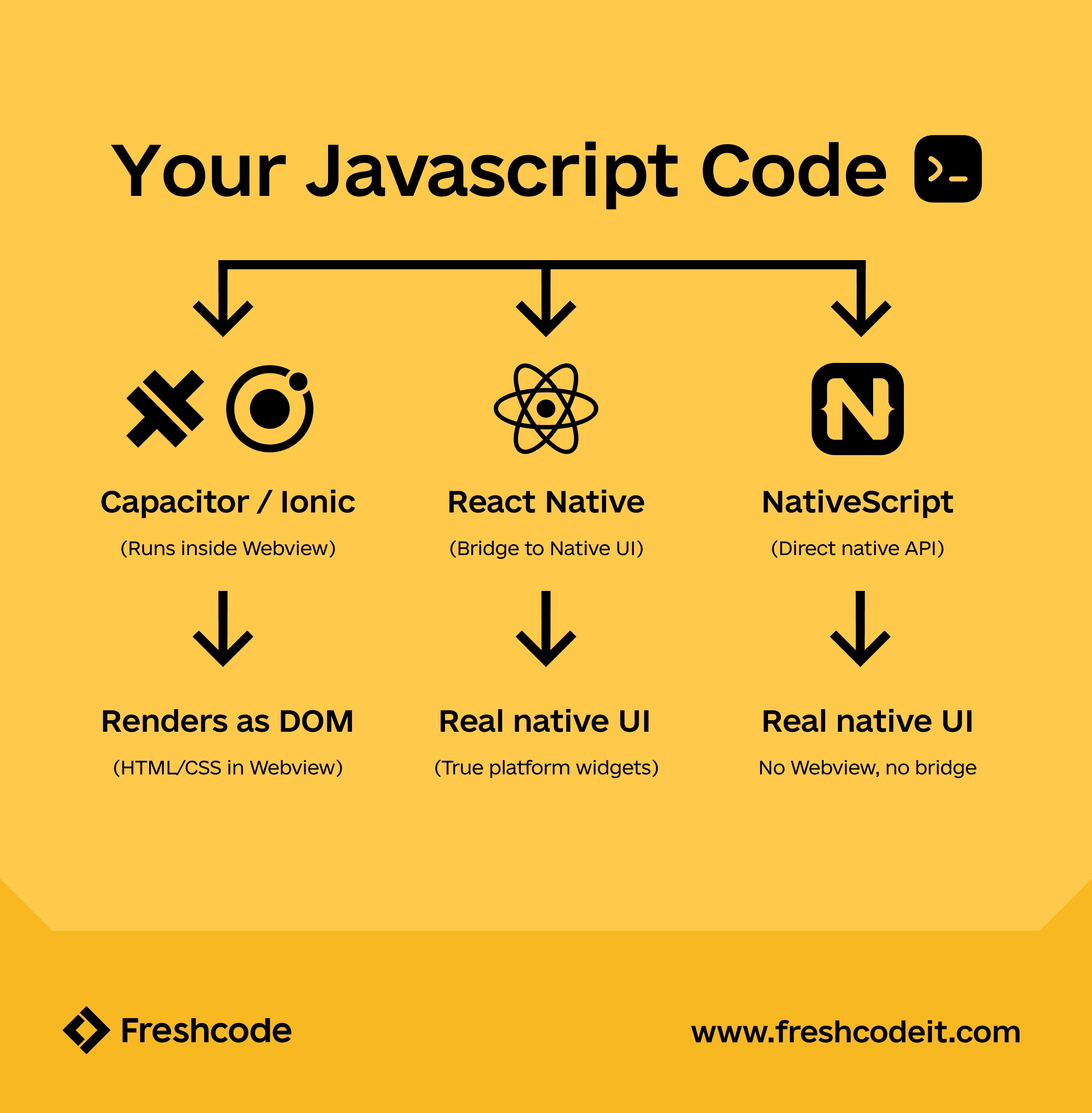
Capacitor / Ionic (WebView): your app is a website running inside a native container. JS/HTML/CSS render in an embedded browser engine, and a native bridge layer exposes device hardware like camera, biometrics, filesystem as JavaScript APIs, letting web components call native functions without leaving the JS layer.. The UI you see is DOM.
NativeScript (native UI from JS): JS/TS talks directly to native APIs at runtime through a reflection-based layer, with no WebView and no message-passing bridge in between. Native UI elements are instantiated and controlled straight from your JavaScript or TypeScript code.
The practical upshot: the further JS sits from a WebView, the closer the app gets to native-like performance, but the more it depends on the framework's native modules and the health of its plugin ecosystem. That trade-off shapes almost every framework decision below, and it's the same trade-off that shows up in every serious JavaScript mobile app development project we've scoped at Freshcode.
Top JavaScript Frameworks for Mobile App Development
There's no shortage of JavaScript frameworks for mobile apps, but only a handful see consistent production use in outsourced and in-house projects alike. Most JavaScript mobile app development work in practice comes down to one of these four options, so it's worth knowing their trade-offs before picking one. Here's how the main contenders stack up.
React Native
React Native remains the default answer when a team asks which of the JavaScript frameworks for mobile apps to standardize on. It has the largest ecosystem of any option here, shares real code and patterns with a React web app, and its hot reloading means a developer can see a UI change on a real device seconds after saving a file without any rebuild, or waiting on a native compile cycle. That alone speeds up the day-to-day feedback loop enough that teams notice it within the first sprint. Backed by a growing community and Meta's continued investment, it delivers high performance close to fully native builds for the overwhelming majority of app screens. This is also Freshcode's primary mobile stack. we've found that the combination of native performance, mature tooling, and a vast hiring pool makes react native app development the safest default for most cross-platform mobile app development projects, unless there's a specific reason to look elsewhere.
Ionic + Capacitor
Ionic paired with Capacitor is the pragmatic choice among JavaScript frameworks for mobile apps when a team already has a solid web app and wants a mobile version without a rewrite. Because it renders through a WebView, it works with any front-end framework — React, Vue, Angular, or plain JS — and gets content-driven apps and PWAs to market fast. The trade-off shows up in screens with heavy animation, complex gestures, or game-like interactions, where the WebView layer becomes noticeable.
NativeScript
Of the JavaScript frameworks for mobile apps that skip the WebView entirely, NativeScript is the most established. What's on screen is genuinely native UI, not rendered HTML. It's a strong fit when a team is already invested in Angular or Vue and wants that investment to carry over to mobile without adopting React. The trade-off is a smaller plugin ecosystem than React Native's, which occasionally means writing a native module yourself for something more mainstream frameworks already have covered.
Vue Native, Quasar & Framework?
Among the smaller JavaScript frameworks for mobile apps, Vue Native, Quasar, and Framework7 fill a narrower niche for Vue-centric teams: lightweight, single-purpose apps where a full cross-platform mobile app development stack would be overkill. They're worth a look when the app itself is, for instance, an internal tool, a companion app, a PWA-first product rather than a flagship consumer app. Next.js paired with Capacitor is also gaining traction as a newer route for teams already standardized on Next.js for the web, letting them extend that same codebase into a mobile shell rather than adopting a second framework. In practice, the setup is a handful of commands:
Run
npx create-next-app@latest my-mobile-app
# in next.config.mjs, set output: 'export' for static export
npm install @capacitor/cli --save-dev
npx cap add ios
npx cap add android
npx cap sync
That last command is worth remembering on its own. Npx cap sync is what you run every time the web build changes, to push the updated assets into the native iOS and Android projects.
JavaScript vs Native vs Flutter: Which to Choose
The "which is best" question rarely has one right answer for JavaScript app development. It depends on the app's performance ceiling, the team already in place, and how many platforms need covering.
Native development still wins when an app leans hard on the platform's own capabilities. For teams weighing cross platform mobile applications against fully native mobile applications, the deciding factor is almost always whether a specific screen needs hardware-level performance, not the framework in general. Flutter is a fair alternative to JavaScript app development when a team is starting fresh, has no existing JS codebase to build on, and prioritizes pixel-perfect design consistency across platforms over reusing existing web skills. For everything in between —which is most business apps — mobile app development with JavaScript wins in faster time to market and on the size of the available talent pool, since JS/TS developers are far easier to find and hire than Dart or dual-platform native specialists. In our own project work, react native app development specifically tends to close that gap even further, since its native-bridge rendering puts it closer to Flutter's performance than a WebView-based option ever gets.
Benefits and Limitations of JavaScript for Mobile Apps
No framework decision is free of trade-offs, and JavaScriptfor mobile app development is no exception. Weighing these honestly upfront saves a lot of rework later, since most teams that regret choosing JavaScript app development did so without checking whether their specific screens fell into the limitations below.
Benefits:

Limitations:
In practice, these limitations rarely rule out JavaScriptmobile app development outright, just narrow which parts of an app might need a native module or a different rendering strategy, while the rest of the app stays comfortably in JS.
How to Build a Mobile App with JavaScript (Step by Step)
Mobile app development with JavaScript follows a fairly consistent workflow across projects, regardless of which framework ends up in the stack. If you're planning to build a mobile app with JavaScript for the first time, expect these steps in roughly this order:
Teams building an MVP development for startups often compress steps 2 through 4 into a single fast sprint, since the goal is a working product to validate with real users, not a polished final build.
When to Choose JavaScript for Your Mobile App
The decision usually comes down to four factors: app type, team composition, timeline, and budget.
App type matters most. Content-driven apps, e-commerce, internal tools, and most SaaS-style mobile products are well suited to JavaScript for mobile app development — the UI patterns are standard, and native's performance edge rarely shows up in daily use. Games, AR experiences, and apps pushing real-time graphics are the exception, where native or a dedicated game engine still makes more sense.
Team composition is the second factor, and often the deciding one. If your team already knows React, React development services built around React Native let that expertise carry straight into mobile without hiring separate iOS and Android specialists. Where in-house capacity is tight, bringing in a dedicated development team that already knows React Native or Ionic tends to move faster than growing a two-platform native team from scratch.
Timeline and budget tend to point in the same direction: a single codebase means less QA surface, fewer specialists to staff, and a shorter path from kickoff to app store submission — which is why cross-platform mobile app development is the default starting point for most product teams, with native reserved for the specific screens or features that genuinely need it.
Planning a cross-platform app? Contact our team — Freshcode's React Native developers can help scope the right approach before you commit to a framework.

with Freshcode

FAQ
Can you build a mobile app with JavaScript?

Yes. Javascript mobile app development covers three real approaches — WebView-based hybrid apps (Capacitor, Ionic), native-bridge apps (React Native), and direct-native-UI apps (NativeScript) — each trading off differently between development speed and performance. Mobile app development with javascript has been production-ready for years now, with all three approaches actively maintained and widely used.
Which JavaScript framework is best for mobile apps?
React Native, Ionic, and NativeScript solve different problems. React Native is the default most teams reach for: the biggest ecosystem, near-native performance, and by far the easiest framework to hire for. Ionic makes more sense when there's already a working web app that just needs a mobile shell rather than a rebuild. NativeScript is the right call specifically for Angular or Vue teams who want real native UI without adopting React.
There's no single right answer that applies to every project. The best fit depends on your team, your app, and what you're trying to ship. If you want a second opinion on which framework fits your case, reach out and we'll help you weigh the options for your specific project.
Is JavaScript good for mobile app development in 2026?
Yes, for the large majority of business apps, MVPs, and content or commerce-driven products. ChoosingJavaScript for mobile app development remains a low-risk decision as long as the app doesn't lean on heavy graphics or real-time hardware demands — it falls short mainly for graphics-intensive games and apps that need to squeeze out every last bit of hardware performance.
Is JavaScript or Python better for mobile apps?
For the app itself, JavaScript, since it has real, mature frameworks (React Native, Ionic, NativeScript) built specifically for mobile UI, while Python doesn't have anything comparable for that job.
Python still has a place in a mobile project as:
- backend services and APIs;
- data processing or ML pipelines the app calls into, etc.
Are JavaScript mobile apps as fast as native?
Yes. React Native and NativeScript aren't simulating native UI, slowing down the page, they're rendering it directly, which is why most screens in a JS-based app perform indistinguishably from a fully native one.
The exceptions are games, 3D rendering, real-time camera or video processing, and the rare screen combining heavy animation with heavy JS logic.