

AI for Legacy System Modernization: PostgreSQL Case Study
Last updated:
2026-06-25
10 min read
Technology


Maksym Leshok
Senior Software Engineer

Sofiia Yurkevska
Content Writer
.avif)
Contents
See more
- A legacy database upgrade becomes a platform migration when business logic is embedded in SQL, triggers and scheduled jobs.
- In real-time operational systems, the migration strategy matters as much as the target version.
- AI is most useful in discovery, dependency mapping, compatibility analysis, validation drafting and review support.
- Human-in-the-loop control is essential. Senior engineers still own risk, design and production decisions.
- Even without mature CI/CD, a disciplined, phased approach can deliver a PostgreSQL 9-14 migration with minimal downtime.
- Moving from container-hosted PostgreSQL to AWS RDS can improve supportability, but it also adds operational considerations that need early testing.
- The biggest hidden benefit of migration work is often a better understanding of the system, not just newer infrastructure.
A database upgrade is rarely just a database upgrade, especially in utility operations. Legacy modernization means using artificial intelligence to speed up the discovery, refactoring, compatibility analysis and validation work inside risky legacy migrations, and this PostgreSQL 9 to 14 upgrade for a utility admin platform is a concrete example. The platform was used by internal teams to manage customer accounts, meter readings, supplier registrations, operational data and reporting across electricity and gas workflows.
The formal goal was simple: move a legacy PostgreSQL 9 deployment running in containers to PostgreSQL 14 on AWS RDS. The real scope was much wider. The platform was built around a Node.js core monolith with several supporting services and a React interface. Over time, a significant amount of business logic had moved into SQL triggers, functions, scheduled jobs and PostgreSQL-specific extensions. Raw SQL was scattered across the codebase. Documentation was incomplete, test coverage was weak, application-side typing was minimal and releases were still manual. Because the system processed near-real-time operational events, long downtime was not acceptable.
That made the migration a useful case for engineers, technical leads and product teams running legacy modernization in operational or regulated environments, where undocumented logic and uptime requirements turn upgrades into slow, high-risk projects. The article walks through AI-assisted discovery and refactoring, compatibility checks, validation and testing, handling ongoing development during the migration, the phases used to execute the move, the practical results, and the limits of AI’s role. Engineers remained responsible for architecture, cutover, validation and production risk, while AI helped reduce the analysis and refactoring effort that usually slows legacy upgrades down.
The real challenge was not PostgreSQL 14
It was uncovering years of implicit assumptions inside the legacy system. The platform had evolved organically. Database objects followed inconsistent naming patterns, raw SQL was spread across services and scripts, and some triggers had effectively become undocumented business rules. Long-running queries had been tolerated in the old environment, and loosely handled JavaScript data often collided with stricter PostgreSQL 14 behavior.
The system also had to operate under real-time constraints:
• meter readings arriving every few minutes, hourly and daily
• supplier registration status updates coming back asynchronously
• background synchronization jobs moving operational data
• internal users depending on the platform throughout the day
This turned the migration into a classic legacy modernization problem: the database was outdated, but the business could not stop. The upgrade had to be delivered with minimal downtime, reliable validation and a rollback path the operations team could trust.
Starting point
The legacy setup included:
- PostgreSQL 9.x running in a containerized environment,
- a Node.js application layer without static typing,
- a React admin frontend,
- several supporting services around a core monolith,
- custom deployment and migration scripts,
- manual release steps,
- weak automated test coverage,
- business logic embedded in database functions, triggers and scheduled SQL jobs.
The team treated the work as a focused modernization stream inside a broader platform improvement effort. The delivery window was eight weeks.
Why was the migration high-risk?
Several technical factors made this upgrade more complex than a normal version jump.
Diagram 1: System and migration context
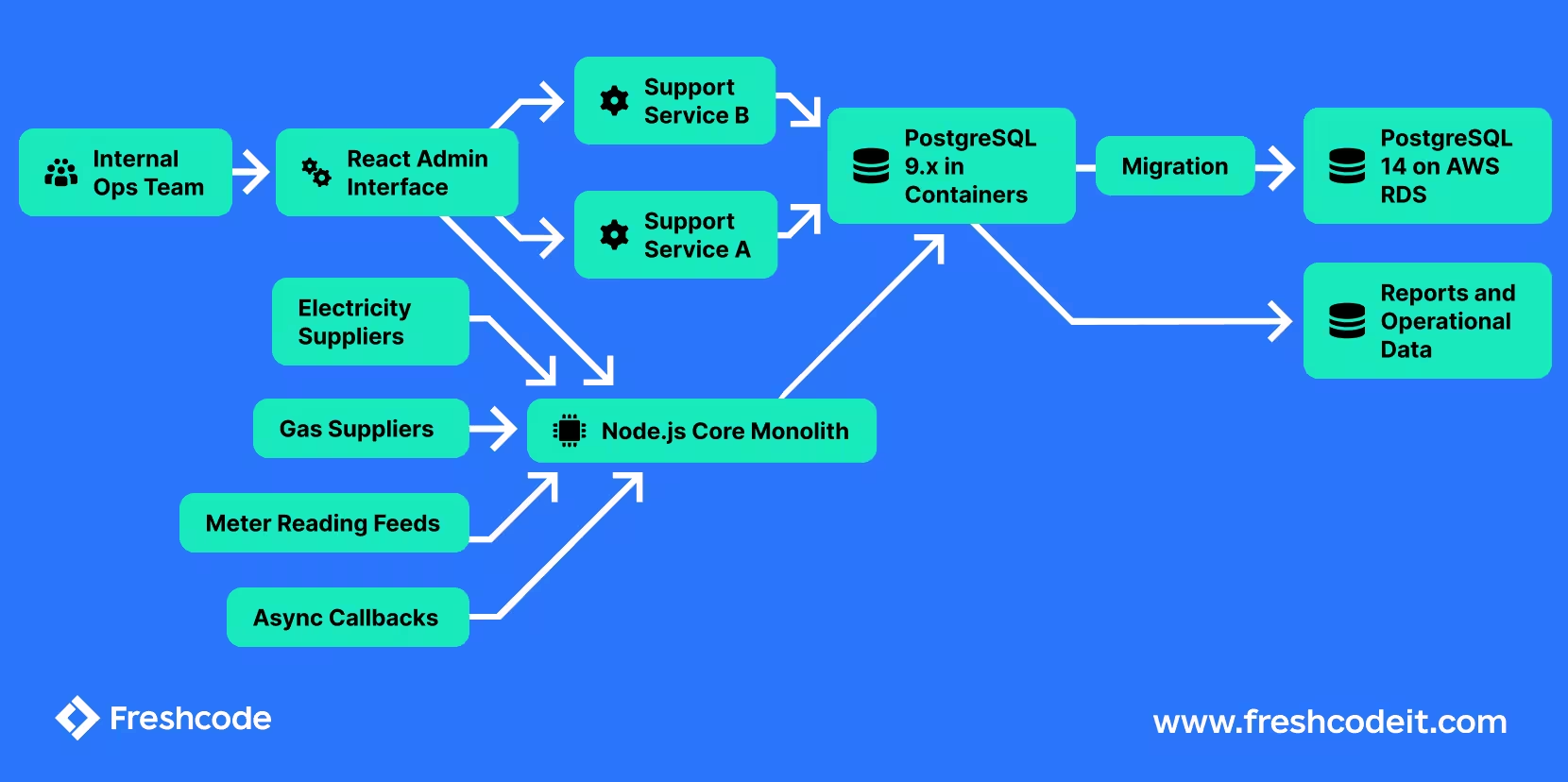
High-level context of the platform before and after the migration. The admin system sat at the center of internal operations and processed near-real-time supplier and meter-related events, which is why downtime had to stay minimal.
How AI Supports Legacy System Modernization
Using AI to "generate code and hope for the best" as a development approach has already proven ineffective, to say the least, in numerous cases [1], [2], [3]. For our task at hand, we needed it for reducing the amount of slow, manual work that usually makes legacy migrations expensive: tracing dependencies, summarizing undocumented logic, drafting validation scenarios and keeping migration work aligned with an actively changing codebase. In the right legacy scenarios, AI-augmented modernization can accelerate timelines by 40–50%, and it can cut technical debt-related costs by 40%, which is one reason many modernization services use it selectively to improve adoption rather than manually expanding every remediation task.
We used an AI-assisted, agentic workflow built around Claude Code for repository-level exploration and refactoring, GPT-based analysis for schema comparison and validation design and Copilot for in-editor review support. In practice, the workflow combined several patterns: multi-step task decomposition, repo-aware code navigation, structured prompt chaining, iterative rewrite-and-verify loops and human approval gates before any production-facing change. Here, generative AI acted as a productivity multiplier, while agentic AI helped compress modernization timelines without removing expert oversight.
For larger discovery tasks, we treated the model as a scoped migration agent: it worked through a bounded part of the repository or schema dump, produced a structured output and then received a narrower follow-up task based on engineer feedback.

In practice, AI contributed in four places.
- tables and functions used by each workflow,
- SQL fragments tied to supplier callbacks and meter updates,
- triggers with likely business side effects, and
- version-sensitive areas that were likely to break on PostgreSQL 14.
That kind of discovery workflow also improves AI adoption by reducing friction from scattered logic and legacy constraints, and it resembles the early discovery phase in AI-powered modernization services.
A typical task looked less like a single prompt and more like an agentic AI loop. We used an AI-assisted, agentic AI workflow where the model scanned a folder or schema dump, grouped related SQL objects, produced a dependency summary, highlighted candidates for service extraction and code migration, and then reran the analysis after engineers narrowed the scope. In practice, agents helped cut slow manual discovery and review timelines by turning repeated repository and schema checks into faster, scoped passes.
Example instructions used during discovery included:
- “Scan this service and list every direct or indirect reference to customer account, meter and registration tables.”
- “Summarize what this trigger function does in plain English, including inserts, updates, status transitions and side effects.”
- “Compare these PostgreSQL 9 queries against PostgreSQL 14 assumptions and flag likely type, casting, or extension risks.”
- “Build a migration checklist for objects related to supplier callback processing and rank by production risk.”
This kind of workflow shortened the path to a usable migration inventory instead of replacing the review process, and engineers still validated dependency assumptions before acting on any extraction recommendation.
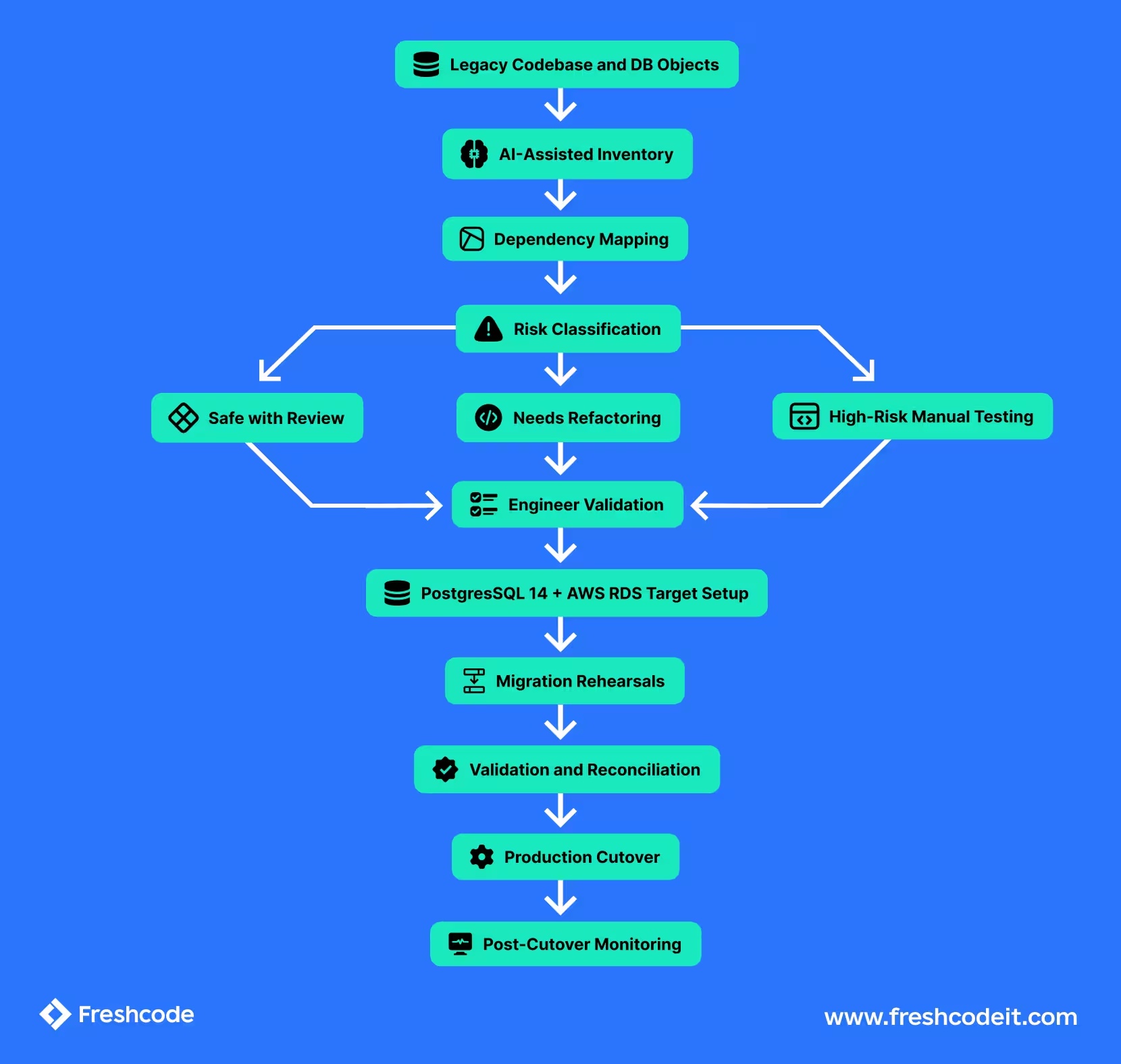
The practical workflow looked like this:
- extract schema object or SQL fragment
- ask AI agents to explain what it does, what might break on PostgreSQL 14, and summarize workflow behavior for non-technical stakeholders
- ask follow-up agents for a safer or cleaner rewrite and early code migration analysis
- review the rewrite manually, since service or logic extraction still needs engineer validation when breaking apart legacy behavior
- generate a validation checklist for the affected workflow
- rerun the analysis after revisions
This was especially helpful for functions, triggers and long SQL statements that had grown over time and were difficult to reason about quickly. In practice, the best option often depended on domain boundaries and operational simplicity, and that detail could matter more than abstract architectural preferences when discussions turn toward safer rewrites rather than larger redesigns.
At scale, AI-assisted legacy code projects have been reported to save over 280,000 developer hours.
The engineers started by defining a compact table of critical workflows:
- create or update a user account,
- ingest meter reading,
- process supplier registration update,
- run operational reconciliation flow,
- generate reporting data for internal teams.
This became a practical playbook for AI-assisted refactoring in legacy environments.
From that matrix, AI helped draft end-to-end test scenarios, happy-path checks and edge-case variants. The generated scenarios were then reviewed, cleaned up and used to create a lightweight E2E suite focused on migration risk rather than full product coverage. In step 3, the team also used AI to compare multiple rewrite options rather than accepting the first suggestion. With tightly reviewed engineering input, this kind of AI-assisted rewrite work can reduce rewrite costs by 30–50% and timelines by 50–80%. Clear success criteria also made it easier to judge progress through lead time, incident rate, AI integration quality, and cost reduction.
This mattered because it gave us a fast, affordable way to add targeted confidence to a system that previously had almost none. In practical terms, AI made it possible to stand up useful migration-oriented E2E coverage in days rather than turning it into a separate testing project. Comparing alternatives early reduces the chance that refactoring discussions turn into late-stage production risk.
That made rebasing more predictable. Instead of manually rediscovering what changed during the migration window, engineers got a focused list of:
- new or modified SQL usage,
- affected services and workflows,
- likely merge conflicts,
- areas where validation needed to be rerun.
This was a small but important multiplier. It helped surface the main bottleneck across parallel initiatives and keep migration work moving without blocking normal product development. Poor data quality leads to flawed AI insights, so validation drafting and review used realistic operational data, and improved data accessibility made those checks more useful. AI algorithms depend on the quality of the data feeding them, which made usable test data and accessible workflow data important for this effort.
Our PostgreSQL Database Migration Process: Four Phases
The migration was handled as a focused modernization track inside an active product roadmap. That mattered because the system could not be frozen for weeks while database work was in progress.
A small migration pod, led by one senior engineer and supported by one additional full-stack engineer during critical phases, owned the core database upgrade work. The broader product team continued delivering regular changes. To keep both streams aligned, AI-assisted repo analysis was used to flag new code that touched SQL, schema-dependent logic, or migration-sensitive workflows. The work moved in four phases.
Phase 1: inventory and risk mapping
The first step was to build a reliable picture of the legacy estate: schema objects, triggers, functions, extensions, cron-based SQL jobs and raw queries spread across services. AI accelerated the inventory and produced first-pass dependency summaries. Engineers validated and prioritized the findings.
Phase 2: compatibility fixes and target setup
Next came PostgreSQL 14 on AWS RDS, plus refactoring of version-sensitive SQL and database logic. Because releases were manual and CI/CD was limited, the team relied on scripted checks, human review and AI-generated draft runbooks to make the process repeatable.
Phase 3: targeted validation and rehearsals
The team ran several migration rehearsals across stage environments and local service setups. AI-assisted test generation helped bootstrap a lightweight E2E suite around the highest-risk operational workflows, which was especially valuable in a project with little existing test coverage.
Phase 4: controlled cutover
The final cutover used a short maintenance window, final synchronization steps, focused production validation and pre-agreed rollback criteria. The combination of rehearsal, targeted automated checks and AI-assisted change tracking helped keep the cutover predictable.
What changed in practical terms
By the end of the project, the platform had moved from a fragile legacy database setup to a more supportable operational foundation:

The project also improved the team's understanding of the system itself. On legacy platforms, that is often as valuable as the upgrade itself. Once the database logic was mapped and reviewed, future changes became less risky.
Results
The numbers below are representative of the actual delivery scale and were kept conservative to reflect a realistic mid-sized legacy platform.
Business impact
Using a conservative blended cost model, the AI-assisted workflow reduced direct migration effort by an estimated $20,000 to $30,000. The bigger gain came from delivery efficiency: the core migration work was handled by a small engineer-led pod without forcing a long development freeze or spinning up a separate large modernization team.
Just as important, the team reduced migration risk in areas that typically become expensive late in the delivery process: undocumented trigger behavior, SQL compatibility gaps, weak test coverage and last-minute merge conflicts caused by ongoing product changes.
For the client, that meant faster modernization with less disruption to day-to-day platform development.
What AI did not solve
This is an important part of the story. AI did not make architectural decisions. It did not decide which workflows were business-critical. It did not validate production safety. It did not replace deep PostgreSQL knowledge. And it did not remove the need for senior engineers to inspect triggers, review migration scripts, or design rollback plans.
It also did not remove the need for disciplined prompting, scoped tasks and iterative review. The useful results came from treating AI as a working assistant inside a controlled engineering workflow, not as a one-shot answer engine.
What it did do was remove a large amount of mechanical effort from the process:
- reading and grouping scattered SQL
- generating first-draft summaries
- producing initial validation ideas
- comparing patterns against version-related risks
- helping reviewers move faster through repetitive checks
That is where AI is most useful in legacy migration work today. Not as an autopilot, but as a force multiplier for experienced engineers.
Diagram 3: Where AI helped vs where engineers led
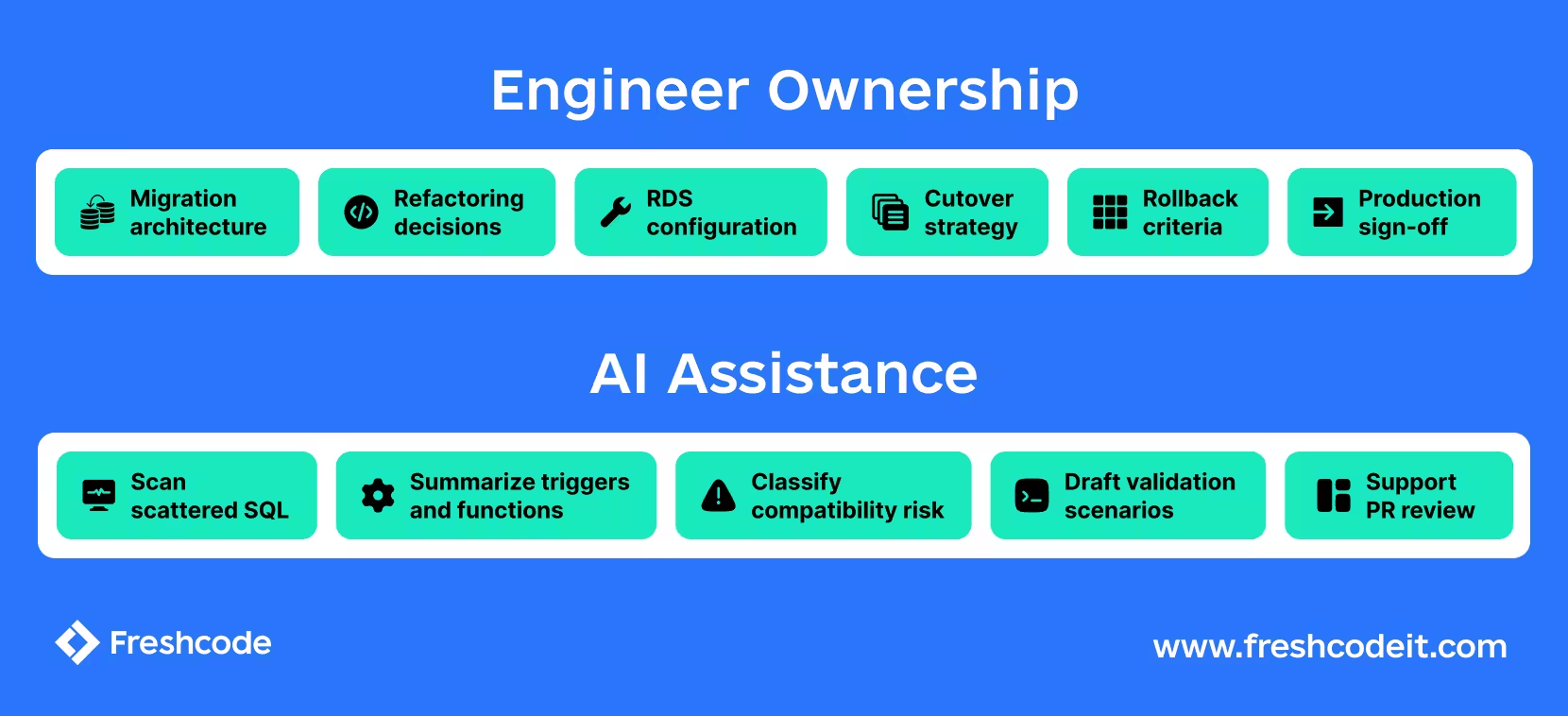
The migration was AI-assisted, not AI-driven in the sense of autonomous delivery. Engineers remained responsible for architecture, safety and production decisions.
Why this matters for similar platforms
Many operational systems in regulated or integration-heavy domains share the same profile:
- years of incremental growth
- business logic is split across application code and the database
- manual release processes
- weak documentation
- limited automated tests
- strong uptime requirements
In those environments, migrations are often delayed because the uncertainty outweighs the value of the upgrade. Across similar platforms and sectors, organizations often spend up to 80% of their IT budgets on legacy systems and maintenance, while IDC reports that about 20% goes to technical debt. Research has found that outdated technology stalls more than 70% of digital transformation efforts, and that technical debt can increase project costs by 10–20% as teams update critical systems to meet new demands. In healthcare, modernization must also meet stringent regulatory compliance standards, while more than 75% of logistics leaders acknowledge slow digital innovation. The broader market signal is clear: the application modernization market is projected to reach $52.46 billion by 2030.
With the right engineering discipline, an AI-assisted workflow can compress the discovery and preparation phases enough to make the project viable without turning it into a risky shortcut. Overstating what AI can do is the most dangerous path of all. Combining strong engineers, a structured migration plan and targeted AI support where legacy complexity creates the most drag.

with Freshcode


.avif)


